
Holo Clock - Google Play
You'll be able to see results in few seconds.
Publisher Description
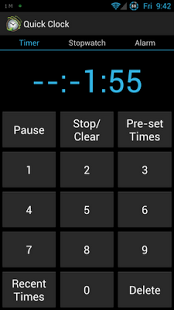
Quick Clock is what the Android Clock should have been. It adds in the much needed Timer and StopWatch functionality along with plenty of options to go with them.
For the timer the following options are available:
-Show a notification of how long is left in the notification bar
-Play a ringtone until the timer is cleared, or just once
-Vibrate until the timer is cleared, or for a set time
-Use custom ringtones
-Obey your phones silent mode
-Quickly set-up predefined times
-Quickly access recently used times
-See time left on the status bar, without even opening the notification drawer
-Set Alarm Volume
-LED Notifications with color picker
Stopwatch functions include:
-Ringing or vibrating after every minute (adjustable)
-Keeping track of laps
-Setting a timer equals to the length of the lap
-Setting a timer equal to the total time
Alarm Functionality includes:
-LED Notifications
-Snooze Functionality
-Standard Alarm Options
-Ability to slowly increase the volume when an alarm goes off (Either over time, or each time snooze is hit)
If you have any feature request/questions/suggestions please feel free to email me them.
*(Note, this still works on older android revisions all the way back to android 2.1+)
**Note: This notification bar does not run as a service. This means if you open too many apps it will stop counting down. The timer will still go off at the right time though. Test the demo app first to see how it runs on your phone.
*** Note: Alarm clock functionality does not work properly. Please do not depend on it.
About Holo Clock
The company that develops Holo Clock is Christopher Jacobs. The latest version released by its developer is 1.0 .
To install Holo Clock on your Android device, just click the green Continue To App button above to start the installation process. The app is listed on our website since 2012-08-22 and was downloaded 0 times. We have already checked if the download link is safe, however for your own protection we recommend that you scan the downloaded app with your antivirus. Your antivirus may detect the Holo Clock as malware as malware if the download link to simply.made.simpletimer is broken.
How to install Holo Clock on your Android device:
- Click on the Continue To App button on our website. This will redirect you to Google Play.
- Once the Holo Clock is shown in the Google Play listing of your Android device, you can start its download and installation. Tap on the Install button located below the search bar and to the right of the app icon.
- A pop-up window with the permissions required by Holo Clock will be shown. Click on Accept to continue the process.
- Holo Clock will be downloaded onto your device, displaying a progress. Once the download completes, the installation will start and you'll get a notification after the installation is finished.
Program Details
System requirements
Download information
Pricing
Version History
version base
posted on 2012-08-22
Several fixes and updates
version base
posted on 2012-08-22
All alarm issues should be resolved. The next update will hopefully fix the timer notification and stopwatch from freezing if too many apps are open.
Disclaimer
Official Google Play Link
We do not host Holo Clock on our servers. We did not scan it for viruses, adware, spyware or other type of malware. This app is hosted by Google and passed their terms and conditions to be listed there. We recommend caution when installing it.
The Google Play link for Holo Clock is provided to you by apps112.com without any warranties, representations or guarantees of any kind, so access it at your own risk.
If you have questions regarding this particular app contact the publisher directly. For questions about the functionalities of apps112.com contact us.
